A closer look.
Two seconds in your Downloads folder, two clicks, and the picture clears up.
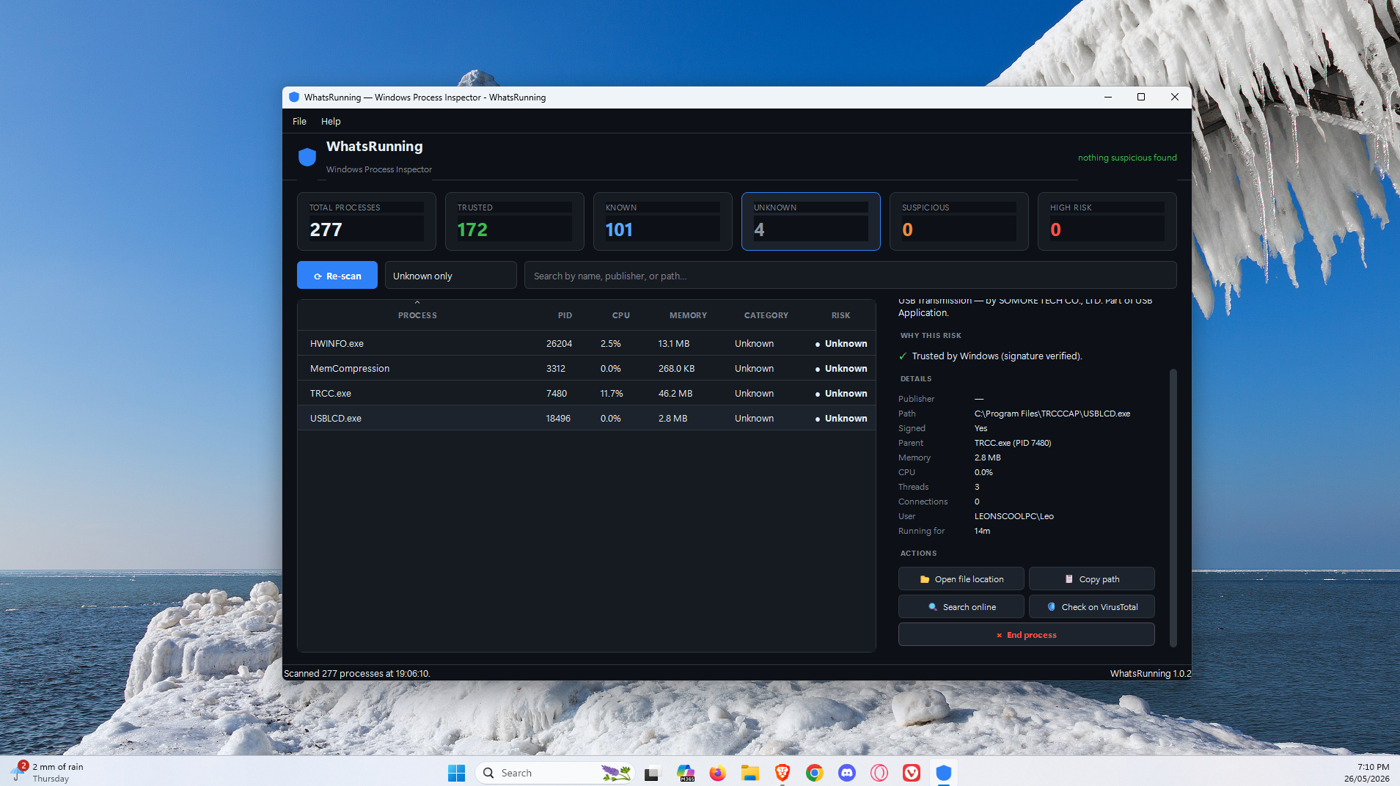
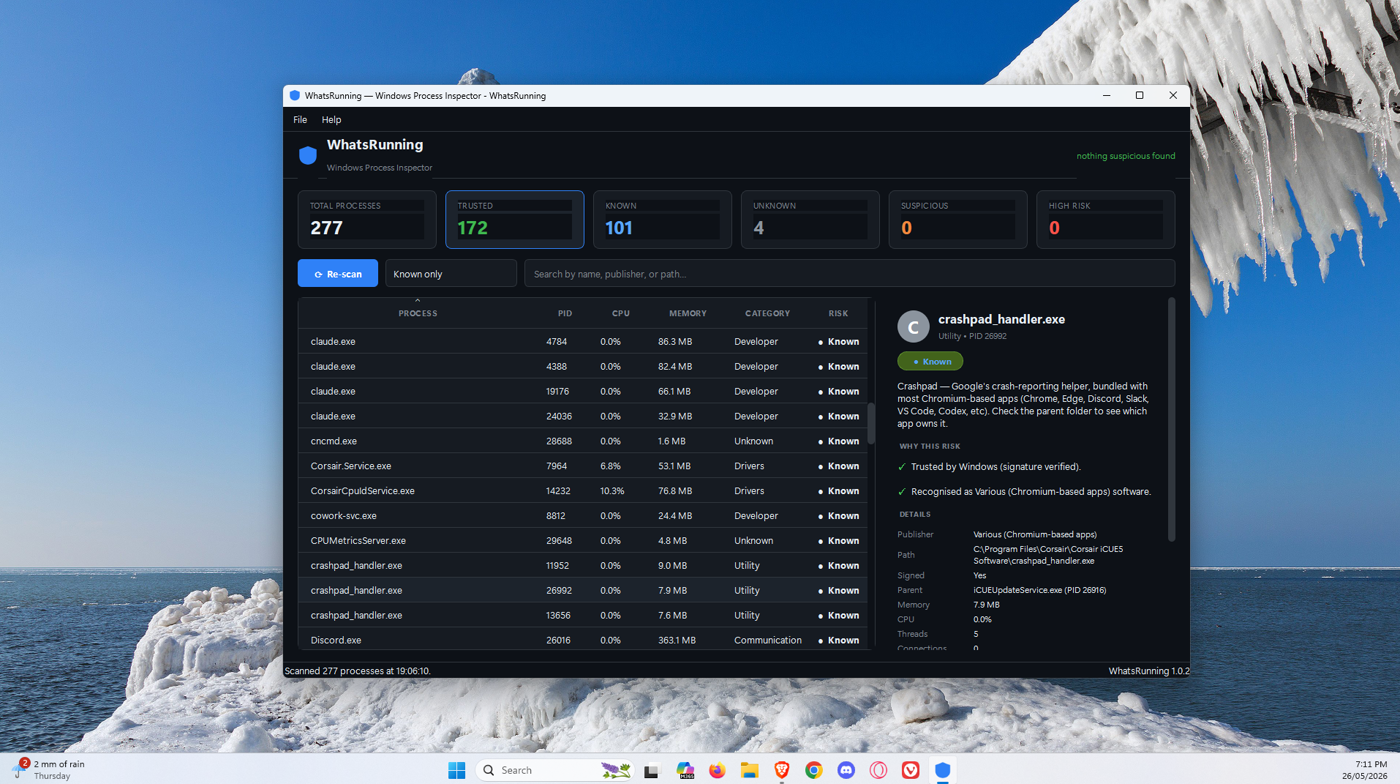
See every process running on your Windows PC and find out exactly what each one is, who made it, and whether it should be there. No jargon, no background scanning, no nonsense.
Most process viewers are written by power users for power users. WhatsRunning explains things instead of assuming you already know.
Every process gets a plain-English description from a curated database of common Windows software, plus its publisher, install path, and parent process.
Uses Windows' own signature verification plus heuristics like path mismatches, sketchy install locations, and known malware command patterns. Each flag explains why.
Nothing runs in the background. Nothing phones home. Click Scan, look at the results, close the app — that's the whole interaction.
Two seconds in your Downloads folder, two clicks, and the picture clears up.
WhatsRunning isn't trying to replace your antivirus. It fills a different gap.
Defender catches known malware from its signature database. It says nothing about the dozens of legitimate-looking processes you don't recognise. WhatsRunning explains what they all are.
Process Explorer is powerful — and intimidating. Forty columns of acronyms, no descriptions, no risk indicators. WhatsRunning is for the people Process Explorer terrifies.
Faster, doesn't require 200 browser tabs, and the answers come from a curated source instead of a hundred "what is svchost.exe?" SEO articles.
Free for Windows 10 and Windows 11. About 50 MB, single-file, no installer required.
⬇ WhatsRunning.exe (v1.0.2)
SHA-256: 918fd93129a8f502e1f39f11862bbd496acbc4190d5fc7e06d2b9c1a049b4a56
Some antivirus engines (notably Norton, Avast, AVG) flag unsigned indie software on first download. It's a reputation heuristic, not a malware signature — see the FAQ if yours does.
The scan itself runs entirely on your machine. No telemetry, no analytics, no background network calls of any kind. The only times the app touches the internet are when you click a specific button:
That's the entire list. You can verify by watching network traffic during a scan — there is none.
No, and it isn't trying to. Defender (or whatever you use) catches known malware. WhatsRunning explains the rest of what's running — the bits your antivirus doesn't comment on. Use both.
It means one or more heuristics fired: the executable isn't signed, runs from an unusual folder, has a system-process name in the wrong path, was launched with a command line associated with malware loaders, etc. Each flag is explained in the details panel. Suspicious is not the same as malicious — it's a signal worth looking at.
Verifying a few hundred signatures against Windows' catalog is the slow part. We batch it into a single PowerShell call, which is the most reliable way to verify both embedded and catalog signatures. Subsequent re-scans within the same session are faster thanks to caching.
Yes. The process database is small for v1 and grows with each release as more legitimate software gets added. If something useful is missing, send it to the project — the database is a Python file, contributions are easy.
No. SmartScreen warns about any executable without a long reputation history or a paid code-signing certificate. The build isn't signed yet (cert is ~$200/yr — coming when revenue justifies it). Until then, click "More info" → "Run anyway" if you trust the source. The SHA-256 above lets you verify the file you downloaded is genuine.
No, those are well-known false positives. IDP.Generic, FileRepMalware, and Win64:UnwantedX-gen are all generic heuristic and reputation detections — not specific malware signatures — that Norton/AVG/Avast (now sharing one engine since the Gen Digital merger) trigger on almost every unsigned PyInstaller-built Python app. The same detections have been raised against Discord, OBS Studio, ScreenToGif, and countless other indie tools. The full source code is at github.com/HandrollDev/whatsrunning — you can audit every line yourself. The SHA-256 above lets you verify your download matches what was published. The fix from our side is submitting the binary to Norton for review and eventually paying for a code-signing certificate. The fix from your side, if you trust the source, is restoring it from quarantine and adding it to your AV's exclusion list.
Yes — the project is small and readable Python. The source is available on GitHub.